Helper Files or Utils
Helper Files keep your code clean and re-usable
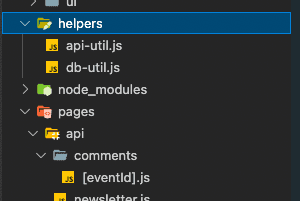
What is Helper file?
One of the well known conventions of React components is that any logic should be broken out of the render function into a helper function. This keeps the component clean, and separates the concerns inside of the component.
Documentation.
- Referenced Documentation here
Usage
This file contains all utility exposed functions and directly available into other classes and components. Here we need to expose every function which we want to use outside while in the Helper Class file we don’t expose methods directly, we expose only class.
We can create multiple util files as well as per our code structure.
Basic Util
js
export function addTwoNumber(number1, number2) {
  return number1 + number2;
}
export function getUserName() {
  return 'JS Mount';
}
export function getNameArray() {
  const data = [];
  for (let i = 0; i < 50; i++) {
    data.push('JS-' + i);
  }
  return data;
}
Usage of Basic Util
jsx
import React from 'react';
import { addTwoNumber, getUserName, getNameArray } from './../../util/util';
const ComponentA = (props) => {
  return (
    <>
      <h3>Welcome to Router Component A</h3>
      <h6>Called util function: Username is {getUserName()}</h6>
      <h6>Sum of two number (3,4) using util.js - {addTwoNumber(3, 4)}</h6>
      Total Names: {getNameArray().length}
      <ul>
        {getNameArray().map((name) => {
          return <li>{name}</li>;
        })}
      </ul>
    </>
  );
};
export default ComponentA;
More Helper Patterns
DB-util
js
import { MongoClient } from 'mongodb';

const dbusername = process.env.mongodb_username;
const dbpassword = process.env.mongodb_password;
const dbconnection = '@cluster0.ewevp.mongodb.net/';
const dbname = 'nextEvents';
const dbprefix = 'mongodb+srv://';

export async function connectToDatabase() {
  const client = await MongoClient.connect(
    `${dbprefix}${dbusername}:${dbpassword}${dbconnection}${dbname}`
  );

  return client;
}

export async function insertDocument(client, collection, document) {
  const db = client.db();

  const result = await db.collection(collection).insertOne(document);

  return result;
}

export async function getAllDocuments(client, collection, sort, filter) {
  const db = client.db();

  const documents = await db
    .collection(collection)
    .find(filter)
    .sort(sort)
    .toArray();

  return documents;
}
Usage of DB-util
js
import {
  connectToDatabase,
  insertDocument,
  getAllDocuments,
} from '../../../helpers/db-util';

async function handler(req, res) {
  const eventId = req.query.eventId;

  let client;

  try {
    client = await connectToDatabase();
  } catch (error) {
    res.status(500).json({ message: 'Connecting to the database failed!' });
    return;
  }

  if (req.method === 'POST') {
    const { email, name, text } = req.body;

    if (
      !email.includes('@') ||
      !name ||
      name.trim() === '' ||
      !text ||
      text.trim() === ''
    ) {
      res.status(422).json({ message: 'Invalid input.' });
      client.close();
      return;
    }

    const newComment = {
      email,
      name,
      text,
      eventId,
    };

    let result;

    try {
      result = await insertDocument(client, 'comments', newComment);
      newComment._id = result.insertedId;
      res.status(201).json({ message: 'Added comment.', comment: newComment });
    } catch (error) {
      res.status(500).json({ message: 'Inserting comment failed!' });
    }
  }

  if (req.method === 'GET') {
    try {
      const documents = await getAllDocuments(
        client,
        'comments',
        { _id: -1 },
        { eventId: eventId }
      );
      res.status(200).json({ comments: documents });
    } catch (error) {
      res.status(500).json({ message: 'Getting comments failed.' });
    }
  }

  client.close();
}

export default handler;
API-util
js
export async function getAllEvents() {
  const response = await fetch(
    'https://next-js-course-9dc05-default-rtdb.firebaseio.com/events.json'
  );
  const data = await response.json();

  const events = [];

  for (const key in data) {
    events.push({
      id: key,
      ...data[key],
    });
  }

  return events;
}

export async function getFeaturedEvents() {
  const allEvents = await getAllEvents();
  return allEvents.filter((event) => event.isFeatured);
}

export async function getEventById(id) {
  const allEvents = await getAllEvents();
  return allEvents.find((event) => event.id === id);
}

export async function getFilteredEvents(dateFilter) {
  const { year, month } = dateFilter;

  const allEvents = await getAllEvents();

  let filteredEvents = allEvents.filter((event) => {
    const eventDate = new Date(event.date);
    return (
      eventDate.getFullYear() === year && eventDate.getMonth() === month - 1
    );
  });

  return filteredEvents;
}
Usage of API-util
jsx
import { Fragment } from 'react';
import { useRouter } from 'next/router';
import Head from 'next/head';

import { getAllEvents } from '../../helpers/api-util';
import EventList from '../../components/events/event-list';
import EventsSearch from '../../components/events/events-search';

function AllEventsPage(props) {
  const router = useRouter();
  const { events } = props;

  function findEventsHandler(year, month) {
    const fullPath = `/events/${year}/${month}`;

    router.push(fullPath);
  }

  return (
    <Fragment>
      <Head>
        <title>All Events</title>
        <meta
          name="description"
          content="Find a lot of great events that allow you to evolve..."
        />
      </Head>
      <EventsSearch onSearch={findEventsHandler} />
      <EventList items={events} />
    </Fragment>
  );
}

export async function getStaticProps() {
  const events = await getAllEvents();

  return {
    props: {
      events: events,
    },
    revalidate: 60,
  };
}

export default AllEventsPage;
Noteables
- Remember to create UTIL files early as it can save you time and headache!
Learn more about it here